

Key Takeaways
- Find your meter on the side of your house or apartment building, on a utility pole, or in a communal location. Remember where it is so you can access it safely and easily for your readings and for the utility workers.
- Identify analog, digital, and smart meters by dialed discs, numeric displays, or networked displays and read accordingly.
- Safety first. Stand on dry ground, steer clear of hanging wires, and don’t break any seals or service equipment before taking readings.
- Take the difference between the previous and current reading in kWh to calculate usage and coordinate readings with your billing cycle to check charges and identify patterns.
- If you use your smart meter data or regular readings to identify patterns in your usage, catch anomalies, and plan efficiency adjustments or appliance upgrades.
- Consult your utility for continued display errors, inaccurate readings or suspected malfunction. Permit only authorized individuals to examine or fix the meter.
===
How to read your electric meter describes how to locate and note the figures that indicate your family’s energy consumption. Most meters have either dials or digital readouts and may indicate kilowatt-hours or peak and off-peak totals.
Reading your meter helps you verify your bill, identify billing errors, and measure savings for new appliances or lifestyle modifications. The body presents step-by-step approaches for standard meter varieties and easy techniques to track readings.
Meter Location
Find the electric meter on the outside wall close to the service entrance or where utility wires enter the building. It’s usually in a metal meter box or affixed next to the main electrical panel. For most single-family homes, the meter is located about knee to chest height on an outside wall facing the street.
Keep in mind that if the service is coming from a side or rear direction, the meter may be located on a side or rear wall instead. Meters can be mounted on a utility pole, particularly in rural or multi-service environments. A pole-mounted meter will be at a location and height determined by local regulations, positioned above head height for safety and accessibility.
In multifamily buildings and even some commercial properties, meters usually reside in a communal utility room or in a common-area hallway near the central electrical panel. These centralized locations can potentially have several meters in a bank, each labeled for a specific unit.
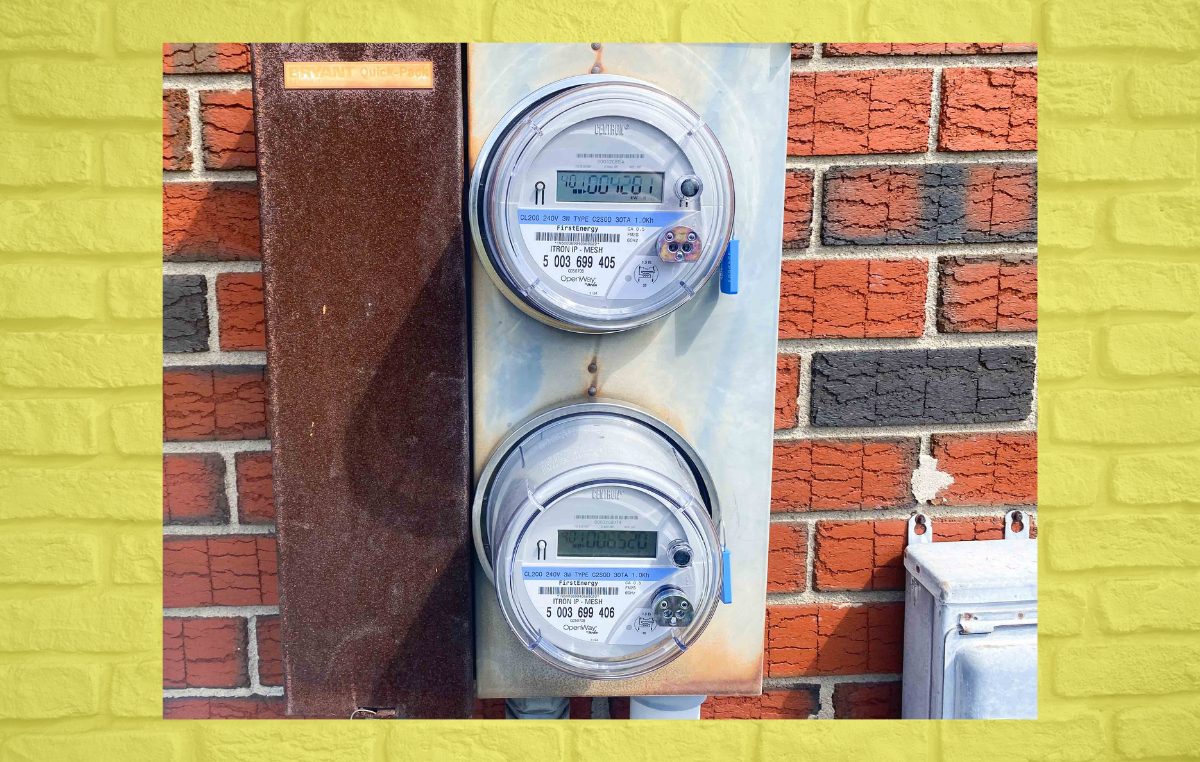
Identify electric meters as opposed to gas, water meters and junction boxes by looking at labels and type of display. Electric meters often have a transparent glass or plastic face with a numeric readout, LED pulse, or digital display and are labeled with the utility company name, model number, and voltage information.
Gas meters are almost always cast metal with exposed pipes and regulators. Water meters tend to be buried under manhole-sized round lids or located in basements and feature a dial embellished with flowing-water icons. If labels are worn, seek the incoming electrical conduit and neutral/ground connection to identify an electric meter.
Occasionally, meters are within the residence, generally in a basement or garage, where the service point is inside. Others could be sitting in less obvious locations like a crawl space, attic, or locked room where permission is needed to enter. Meter location is important.
If your meter is in a difficult location to reach, keep in mind that the utility companies may need to have it in clear, safe access for readings and maintenance. If you encounter the meter behind a locked gate, marked cabinet, or in a landlord-controlled hallway, note who has the key or how to request access.
Meter location varies by meter type. Smart meters typically include a digital display and wireless radio and can be installed where they can communicate with utility networks. Old fashioned electromechanical meters have spinning disks and analog dials and can be placed in the same locations.
Local building codes, utility rules and neighborhood practices often determine exact placement, so check with your utility or local code office if placement seems unusual. For subsequent readings, record the precise location with a snapshot and note height and obstruction. Ensure clear access pathways for meter readers and servicemen.
Meter Types
Electric meters come in three main forms: analog, digital (electronic), and smart meters. All measure energy in different ways, provide different on-site readouts and support different utility functions. Residential meters are typically electronic (digital) or analog.
Commercial meters tend to be larger and may measure additional parameters such as kW demand and kVArh. Here are the meter types in bullet form.
- Analog meters (mechanical dials or rotating discs)
- Digital/electronic meters (LCD or LED numeric displays)
- Smart meters (digital display plus remote data transmission)
Analog
Analog meters can be recognized by their row of mechanical dials or a spinning disc behind glass. Read the dials from left to right, observing the direction that each pointer points because some dials are clockwise and some are counterclockwise.
Write down the number just before the pointer. If the pointer is between two numbers, always use the lower number unless a previous dial reads zero.
Analog meters, which you must read yourself, are uncommon in new installations. You might still find them in older homes and some quad or more dial gas meters.
Commercial analog meters can have more dials and can have additional registers for separate circuits.
Digital
Spot digital meters by the LCD or LED screens that display numbers directly. A standard digital metric meter displays five digits, a decimal, then more digits. Read the displayed kilowatt-hour (kWh) total.
Some digital meters are single-rate and show one kWh total. Others are dual or multi-tariff and show two rows of digits or rotate through peak and valley consumption.
Electronic meters can show identifiers, error codes, date, rate labels or maximum kW demand. Others have a tiny set of mechanical dials that match the digital total kWh reading as a backup visual aid.
Press any front-panel buttons to flip through displays and identify which line is relevant to your requested reading.
Smart
Recognize smart meters with a digital display and communication modules. They transmit readings directly to the utility. View near real-time usage anywhere with a home display, mobile app, or utility website, which typically displays interval data, daily totals, and peak demand.
Smart meters enable net metering for solar systems and time-of-use (TOU) billing, and deliver multiple reading types like kWh, kW demand, and kVArh as needed.
Use the information to identify trends, perform load-shifting to off-peak time periods, and maximize energy efficiency for savings. Commercial smart meters can include advanced meters for multi tariffs and power quality metrics.
Reading Your Meter
Before you head to the meter, collect a flashlight, notepad, and pen. Make sure the way to the meter is unobstructed and illuminated so you don’t have to strain to find your place on the display or dials at an uncomfortable angle. For meter reading, write down the reading exactly as displayed.
Meters usually tag the number with “kWh” and sometimes have separate readings for peak, off-peak, export, or import. Contrast this reading with prior ones to identify shifts and tendencies in usage.
1. Safety First
Stand on dry ground and do not touch exposed wires or service panels when reading your meter. Keep your hands dry and wear rubber-soled shoes because small slips can have big consequences.
Don’t mess with seals, covers, or the meter itself because modifying equipment is unlawful and unsafe. Keep children and pets away from the meter so you can work undistracted and avoid any incidental contact.
2. Analog Dials
Begin with the leftmost dial and continue to the right, recording the number the pointer has just passed. Some dials turn counterclockwise, so verify the arrow or watch the sequence prior to writing.
If the pointer sits between two numbers, write down the lower number unless the next dial to the right is near zero. Then subtract one from the lower number. Disregard any red numbers or markings that are not included in the total kWh reading.
Create a simple table on your notepad: column one for dial position, column two for recorded digit. This helps prevent transcription errors and makes comparison with past readings straightforward.
3. Digital Displays
Read the kWh number directly, dropping leading zeros and any decimal fractions unless your billing uses them. Some digital meters show multiple screens: total kWh, peak and off-peak, export, or generation.
Hit a button to wake the screen or to page through screens. Holding a button for several seconds may display export or other specialized information. For scrolling screens, wait for the figure with “kWh” at the bottom right to come up and write it down.
Keep an eye out for fault codes or strange icons. Record them and call the utility if you believe there is a fault.
4. Smart Data
Get your smart meter data through the utility’s website, mobile app, or an in-home display unit for near real-time numbers. Preview hourly, daily, or monthly breakdowns to identify peak load periods and usage patterns.
Download reports to track consumption over time and set alerts for spiked or sustained high usage. Determine which reading is import versus export so you properly attribute energy pulled from the grid or fed back.
Usage Calculation
Usage calculation shows you how much electricity you used and indicates where to target your efficiency efforts. Start with a definite reading approach, record dates and times, and any special readings like exports or generation numbers before getting into the specifics.
Kilowatt-Hours
A kilowatt-hour is the equivalent of using 1,000 watts for one hour. When you read your meter, the difference between two readings is the kWh consumed in that interval, which is the fundamental unit utilities use to bill you.
Digital meters usually report total kWh right away and can record intervals, while analog meters require you to read the dials from left to right and apply the difference method.
With kWh you can guesstimate appliance consumption by verifying each equipment’s power rating and operating time. For instance, a 1,200 W heater operating for two hours consumes approximately 2.4 kWh.
Monitoring these numbers on a daily or weekly basis will help you track down energy hogs such as heaters, water pumps, or aging refrigeration units. Cross-check kWh totals on the meter with those on your electric bill to verify charges and identify billing errors.
Frequent meter checks can indicate trends and detect leaks or unusually high standby loads before bills flare.
Billing Cycles
Find your billing period from the begin and end dates listed on your bill. Get meter readings at the same time of day around those dates to sync your records with the utility’s cycle. Consistency minimizes timing errors when comparing usage.
Follow readings over cycles to detect surges or declines. Note date, time, and meter kWh and maintain a rudimentary log. This habit simplifies attributing changes to behaviors such as putting in an appliance or shifts in occupancy.
| Billing Period Start | Billing Period End | Meter Start (kWh) | Meter End (kWh) | Usage (kWh) |
|---|---|---|---|---|
| 2026-01-01 | 2026-01-31 | 12,450 | 12,780 | 330 |
| 2026-02-01 | 2026-02-28 | 12,780 | 13,020 | 240 |
Use the table to compare month-to-month usage and identify anomalies associated with weather, guests, or equipment failures.
Tariff Impact
Review your rate type: flat, tiered, or time-of-use (TOU). They all impact cost per the same kWh differently. Flat-priced means one price per kWh. Tiered raises the price over a threshold. TOU charges more during peak windows.
- For flat rate, multiply total kWh by unit price to estimate cost.
- For tiered plans, break down usage into tiers by thresholds and apply each tier’s rate.
- TOU – split usage into peak and off-peak hours and apply rates.
Where possible, shift high-load activities to off-peak times. Run dishwashers or EV charging overnight and think about programmable timers.
Beyond The Numbers
A meter reading provides you with raw numbers. Making sense of the raw results transforms information into insight. This is where you use meter readings to expose consumption patterns, detect issues, plan enhancements and get family members involved for long-term savings.
Usage Patterns
Drill down on daily, weekly, and monthly readings to identify when your household consumes the most power. Track usage for at least a month to see routine peaks: mornings when kettles and heating start, evenings with cooking and entertainment, or midday spikes from air conditioning on hot days.
Graph easy charts with daily bars for a week and a line for month-to-month totals to visualize trends and seasonal shifts. Correlate spikes with specific activities such as laundry cycles, charging a vehicle, or guests staying over. Keep in mind that a few utilities actually publish peak and off-peak hours.
If you shift your major loads to an off-peak time, you will pay less. They track daily usage to identify subtle changes that accumulate. Use this insight to tweak schedules or select better-timed runs for large appliances to smooth spikes and reduce usage.
Anomaly Detection
Compare current meter values to historical averages to detect abrupt increases or decreases. A sharp unexplained increase might be a sign of a failing appliance, a stuck relay, or wiring loss, while a decline could signify a meter fault.
If you have a smart meter, set alerts for consumption thresholds so you receive notifications in real time. When you spot an anomaly, document dates, times, and possible causes, then run simple tests: turn off circuits, note changes, or unplug suspected devices.
Maintain a list of outliers to pursue with your utility or an electrician. Rapid detection and reporting can avoid energy waste and safety hazards.
Appliance Audits
- Detail all the major appliances and approximate daily run times.
- With the meter baseline recorded, turn off all nonessential devices and record the new reading to establish a quiet house baseline.
- Switch on one device at a time for a set period, record meter shift, and calculate energy consumed. Energy consumed in kilowatt-hours equals the change in meter reading.
- Sort appliances by recorded consumption and locate repair or replacement candidates.
- Calculate savings from swapping out old inefficient units with efficient models and budget and time upgrades.
Knowing single-appliance draws tells you what devices drive your bill. Substitute or schedule power-hungry appliances, engage in conscious behavior, and communicate outcomes with family to create mutual accountability.
Setting goals from history, such as cutting your monthly usage by 10% or shifting loads to off-peak, establishes concrete, measurable objectives.
Meter Troubleshooting
Meter troubleshooting starts with a fast, concentrated device and display check to reduce likely causes prior to seeking assistance. Look for obvious signs of malfunction: stuck dials, blank or unreadable screens, flashing error symbols, or readings that jump erratically.
Remember meter type—analog dials, digital readouts, or smart meters with screens and LEDs—as each indicates faults in different ways and might provide test modes to verify display integrity.
Inaccurate Readings
Make certain you’re reading the right meter for your unit, especially in multi-unit buildings where meters sit next to each other. For dial meters, read left to right and note the last full digit when a hand falls between numbers. For digital meters, copy down the number and decimal places shown.
Double-check entries to avoid recording errors and compare readings to known consumption. Estimate appliance hours and typical kWh use, or compare against past bills. Think recent events, such as power outages, new appliances, or electrical work, can temporarily skew readings or shift load profiles.
If readings persistently aren’t believable even when installed properly, investigate the meter’s configuration and settings if available. Some smart meters can change modes that determine the type of totals or time-of-use registers they show. Document the inconsistencies, including date, time, and meter snapshot, as it allows utilities to confirm a pattern.
Display Errors
Look for special error messages, codes, or flashing symbols. This typically identifies the problem. Most meters have a test mode or self-check that cycles all the display elements. Use it to verify if segments, LEDs, or LCD lines are going bad.
If a digital screen is blank but power is present, attempt a manufacturer-recommended reset or button sequence to re-illuminate the display. Write down any error code, how frequently it occurs, and under what circumstances it appears.
Analog meters with a frozen dial or skipped teeth indicate mechanical failure. If resets and checks don’t clear the error or the display blocks reading, advise your utility and give them your recorded codes and times.
Professional Help
Ask for a formal inspection or accuracy test from the utility when you suspect a fault. Never open meter enclosures on your own; only utility personnel or licensed electricians should be working on any wiring or repairs.
When troubleshooting, experts will verify connections, sealing, and installation configuration to confirm the meter corresponds to your supply and tariff such as time-of-use. Adhere to meter check schedules if local regulations recommend testing.
Keep track of all correspondence, test results, and steps you take. You’ll want a clean record for complaints or follow-up.
Conclusion
It sounds complicated, reading an electric meter feels simple once you know what to watch for. Check the meter box first, observe the style—digital, dial, or smart—and peruse the display at your leisure. For dials, read left to right and write down numbers as they appear. For digital meters, select the main screen and search for a ‘reading’ or ‘total’. To calculate daily use, subtract two readings and divide by the days between. If you notice odd readings or damage, photograph it and call the utility. Record readings on a sheet or app to identify spikes. Small steps add up: record weekly, compare bills, and fix leaks like old chargers or faulty heaters. Attempt one definite reading at this point and compare it to your previous bill.
Frequently Asked Questions
How do I find my electric meter?
Search for it on an outside wall, in a basement, garage, or meter box. See if your multi-unit building has a central panel. If you don’t, call your utility; they will tell you exactly where it is.
What are the common types of electric meters?
Typical types include analog (dial), digital, and smart meters. Analog meters have rotating dials. Digital meters display numbers on an LCD. Smart meters transmit readings remotely. Each shows usage differently.
How do I read a digital meter?
Read the numbers left to right on the main display. Disregard any flashing numbers or second screens unless your utility directs you to otherwise. Record the entire number, not the decimal.
How do I read an analog (dial) meter?
Read dials left to right. If a pointer is between numbers, write down the lower number. If it is between 9 and 0, write down 9. Cross-check with your utility’s guide to be sure.
How do I calculate my energy usage from meter readings?
Subtract the previous reading from the current reading to obtain the kilowatt-hours (kWh) consumed. Multiply kWh by your tariff rate for estimated cost. Refer to your utility bill for precise rates and fees.
What should I do if my meter reading looks wrong?
Take a clean snap of the meter and note the date and time. Call your utility and give them the photo. They can check for accuracy and schedule an inspection if necessary.
Can I read a smart meter myself?
Yes. Most smart meters show usage on a digital readout or through a web interface. Tap your utility’s app or site for real-time information and usage reports.